Have you ever been sent an iMessage that says “Happy New Year” and upon opening it you find your phone showing a fireworks display? Or “Happy Birthday” triggering balloons? While these automated triggers are great, you can actually use those effects with any text you want.
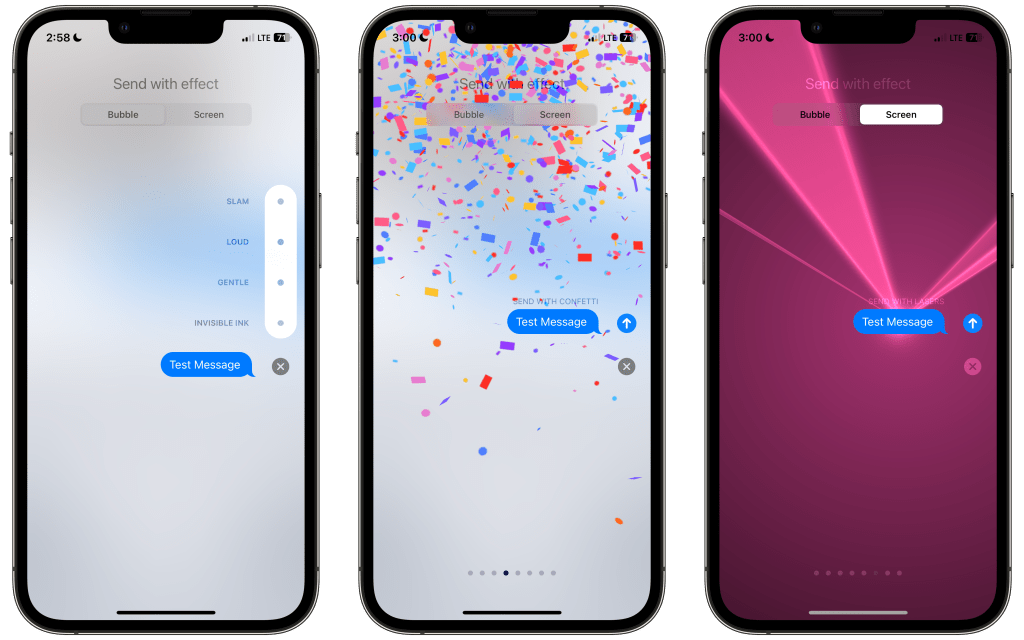
In Messages, once you put your message in the text area, just press and hold on the send button and you’ll be greeted with the Send With Effect screen. Message effects impact just how the message is sent, while screen effects take up the entirety of your devices screen.
The included effects for Messages are:
- Slam
- Loud
- Gentle
- Invisible Ink
The included Screen Effects are:
- Echo
- Spotlight
- Balloons
- Confetti
- Love
- Lasers
- Fireworks
- Celebration
Once you do that, the recipient of your message will be treated to a little surprise when they open your message. Do you use message effects in Messages? What’s your favorite? Let me know down in the comments below!


My friends and I use the invisible ink effect to hide spoilers in our group chat.
LikeLike
That’s a really good idea! I never even thought of that! I’m gonna be passing that tip onto my friends!
LikeLike