At their recent Glowtime event, Apple announced that iOS 18 would be hitting devices on September 16th, 2024…but maybe you’re the tech support of your family and friends. Maybe you’re itching to start tinting your Home Screen icons. Heck, maybe you’re just really impatient and you want the fun new features now! Whatever your reason, here’s how to install iOS 18 today!
But before we begin a quick WARNING: Until the official release this is still considered beta software. Issues can still crop up so always backup your data before doing something like this. Just because something doesn’t go wrong for one user doesn’t mean it couldn’t go wrong for another. With that out of the way, let’s get your phone updated.
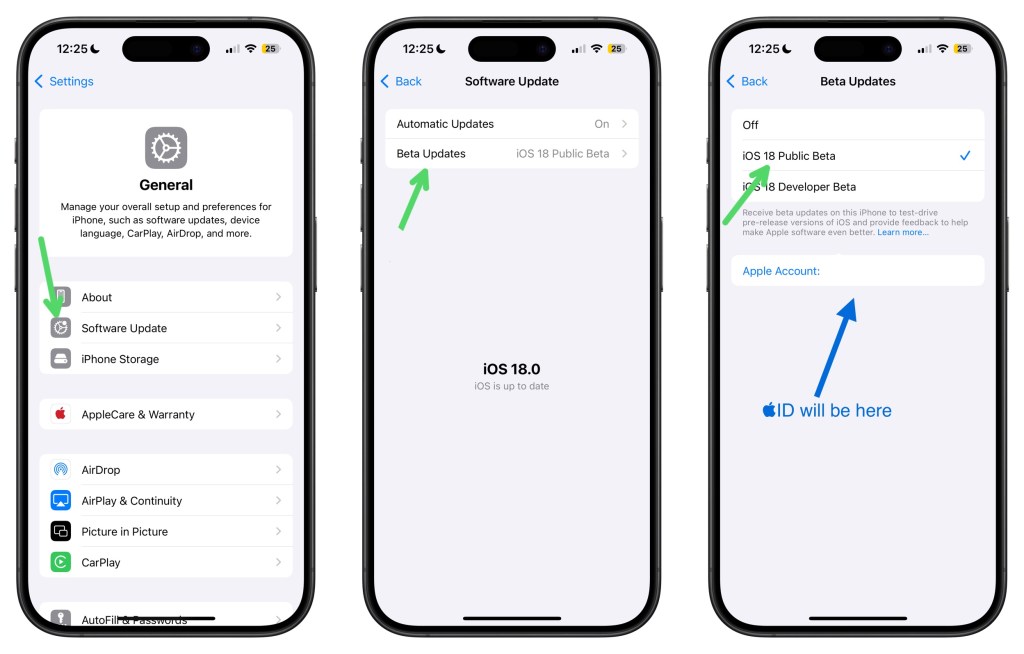
- Open the Settings app
- Tap General then Software Update
- Tap on Beta Updates (these should be off by default)
- Tap iOS 18 Public Beta
- Install like normal
Once the update installs and your device reboots, you’ll be on the latest version of iOS and ready to check out a bunch of the awesome new features. If you’re like me and excited to check out Apple Intelligence, just note that it isn’t part of this update and Apple said that will be in beta later this fall.
If you installed iOS 18 on your device early, what was the feature or reason that you made you do it? I’d love to hear them down in the comments below!

 Dan Stransky