This year’s WWDC was an interesting one for sure. As per usual, the company revealed this fall’s software releases for its major platforms: iOS, iPadOS, macOS, and watchOS. In a lot of ways, this felt like a more subdued year, though there’s at least one controversy that I will also be touching on in another article. I think the weirdest part of this year for me was that I wasn’t able to pick three things that really excited me. Yeah, there’s some cool stuff coming, but only one thing that really made me say WOW.
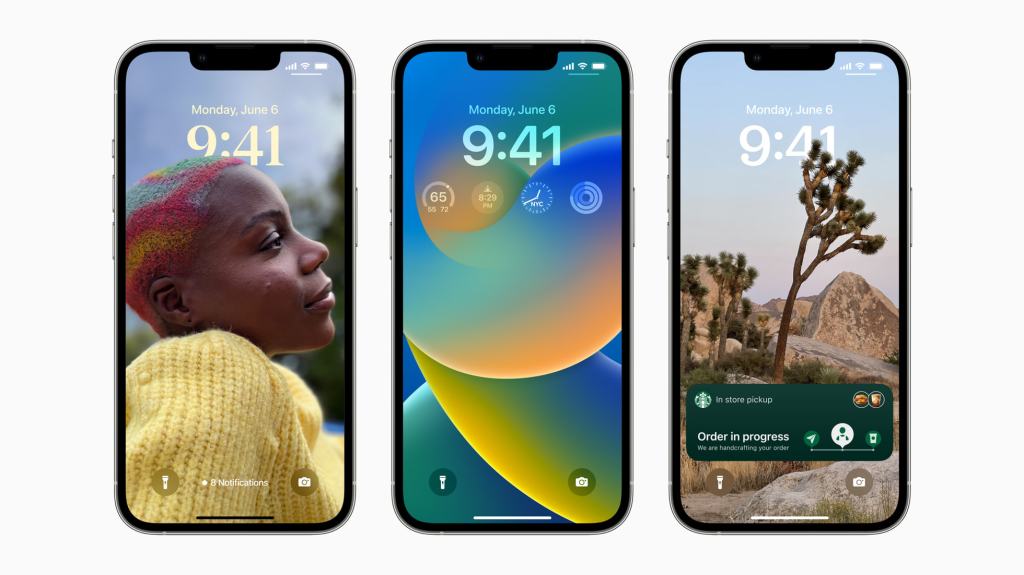
With iOS 16 comes a brand new way to customize your iPhone: customizable lock screens. Based on what I saw in the presentation, it looks like Apple went all out on this one. This fall, for the first time, a lot of iOS users are going to get to experience customizing their lock screens and I’m so happy for them. For me, however, it’s more of a return.
As always, I never hide the fact that the year the iPhones 8 and X launched, I made the jump to Android, returning to Apple’s platform in early 2020, right before all hell broke loose with COVID here in New Jersey. The first two Android phones I used during that time were the Samsung Galaxy S8 and the Note 9. One of the things I really liked about them were all of the customization options that Samsung offered. When it came to customization, Samsung really set the bar.
I wish I could remember the names of the apps that they offered, but unfortunately I wasn’t able to recall. I did try running a quick Google search to see if I could uncover them but I was having trouble getting anything to come up. What I do remember is that they had apps that allows you to customize your lock screen, the notification shade, and even the multitasking area of the phone. It was great.
As soon as I saw Apple show off the custom lock screen feature, I was immediately taken back to creating custom lock screens (and always on displays) for my Samsung devices. I was never someone with any desire to jailbreak my iPhone just to add customization tweaks, but if Apple’s willing to give us some, I’m willing to use them.
I think the thing that excites me the most about the custom lock screens is the ability to add widgets to the lock screen. While I really did want interactive widgets to come to iOS 16, this is a nice next step. It should come as no surprise that widgets on the lock screen bear a striking resemblance to complications on the Apple Watch. There’s a part of me that starting to wonder if with watchOS 10 we will finally see them change the term “complications” to “widgets”.
A lot of the times when I pick up my phone throughout the day, it’s to get information that could easily be given to me in a glanceable format. It’s never anything major, rather little things like what the temperature is. And yes, I know I can get that information from my Apple Watch, but sometimes I don’t have my Apple Watch on. It’s nice to be able to have as many ways as possible to get information from your device, as quickly as possible, regardless of circumstance.
All of this praise comes without even talking about the new lock screen backgrounds. While I have seen some of them shown off already, the one that was most exciting to me was the live updating weather wallpaper that Apple showed off during the presentation. I feel like that won’t be the most exciting lock screen background to use on a bright sunny summer day, I could see that being really enjoyable in the winter when it’s snowing, or during a summer thunderstorm.
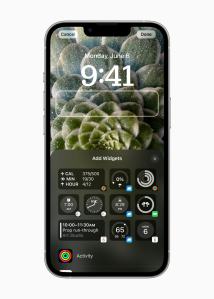
As someone who does have a few wallpaper related shortcuts that I’ve shared in the past, I am curious to see how they work with iOS 16. At some point during the summer, once the public beta launches, I will probably be installing it on my phone so that I can take a look at my shortcuts and have them ready for when iOS 16 launches properly in the fall.
In addition to giving you new ways to customize the lock screen, including font, color, and widget placement, another great aspect of the lock screen in iOS 16 is that you can tie them to a focus mode. When Apple was showing off switching lock screens, it reminded me of the interface for switching watch faces on Apple Watch. The fact that you can lock a lock screen to a focus mode, however, is really freaking cool. I could absolutely see that being useful for setting a different lock screen for when I’m at work, as opposed to another when I am home, or out shopping.

 Dan Stransky