Last month, I wrote about how Marvel Unlimited needs widgets on iOS. I had planned to follow up with a post later this month about all of the different ways Marvel could improve their all-you-can-read smartphone and tablet apps. It appears Marvel doesn’t want to hear the gripes I have with their service, though, as yesterday they launched an update that introduces the All-New, All-Different Marvel Unlimited. While there’s still no widgets, a lot of the things I was going to put in that article were actually addressed in this update, so I figured I’d share. If you’d prefer to read Marvel’s description of the features instead of mine, I understand. You can read that here.
Still here? Great! Let’s jump into it — there’s a lot of ground to cover.
Downloads Are Massively Improved
The first area where Marvel has made massive improvements to their app is in regards to downloads. Prior to the latest update, there were two things about downloads that sucked: you had to add the comics you wanted to download to your library and you were capped at 12 downloads. The comics on Marvel Unlimited aren’t long — they’re single issues. That meant that if you had a long flight and didn’t plan to connect to wifi, you could bring the equivalent of two trade paperbacks on your device for the flight. If you plan on reading a lot of comics on the plane, that just isn’t going to cut it.
With the All-New, All-Different Marvel Unlimited, there’s now a download button the page for each individual issue. You just press the button and the book downloads. You can download as many books as you want and you do not have to add them to your library first.
Reading Lists Got So Much Better
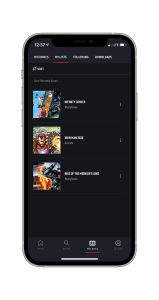
Another issue that I had with Marvel Unlimited up until yesterday was how it handled pinned reading lists. Previously, you could pin a reading list to your home page (for example, Rise of the Midnight Sons or a Character Close Up on Loki). This was a great way keep a reading list easily accessible and was actually what I was using to read the Iron Man 2020 event whenever the mood struck me. The problem was, pinning a reading list on my iPad would not pin that same list on my iPhone.
I don’t know if you’ve ever browsed the reading list section of Marvel Unlimited but it was pretty rough. While there were different sections for characters, events, etc, there was no way to sort these past the default option which was (I assume) spotlight chronological. That meant that if you wanted to find a reading list for a particular character or event, you had to just scroll through and keep your eyes peeled.
With the new update, both of these gripes are fixed. Saving a reading list now adds it to the “Reading Guides” section your library and this area persists between devices. No longer do you have to double add a list just to have access on both of your devices. Finding reading lists is also well-improved. You can now choose which Reading Guide areas you’d like to see and then you can choose how to sort them. This is particularly useful for character Reading Guides — I don’t have an encyclopedic knowledge of every character Marvel has ever done a list for. Now I can just Sort A-Z and go to where the character should be. If they’re there, great. If they’re not, I know to look for books to read featuring them another way.
Marvel Insider Integration and Infinity Comics
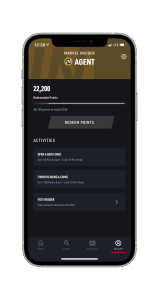
One thing I always thought was odd about Marvel Unlimited was that there was no integration with Marvel Insider — the company’s rewards system. Now you can earn Insider Points inside the Marvel Unlimited app. There’s a list of what you can do, how many points you’ll get, and how many times you earn each during a week right inside the app.
A move like this really shows that Marvel is embracing their all-you-can-read service and understand that some people truly are using this in place of buying every new book that comes out that they want to read.
Further showing their understanding that this is the platform some people are going to choose to consume Marvel content, the company has also introduced a line of Marvel Unlimited exclusives, dubbed Infinity Comics. There’s a whole writeup from the company on them and while I haven’t had a chance to actually read one yet, I get the gist of it.
Infinity Comics are Marvel Unlimited exclusives, from the companies top creators, designed with tablets and smartphones in mind. Instead of each comic being presented in a page view, the comics are essentially one giant vertical comic that you scroll through. I looked through the first few pages of X-Men Unlimited Infinity Comic #1 and I can already get a sense of how Marvel will potentially do some really cool things with the format. I’ll have more thoughts on these comics once I’ve had a chance to read some of them.
In the meantime, there’s 27 comics available for subscribers to read at the time of this writing, but Marvel looks to have over 100 issues out by the end of the year!
Other Improvements
In addition to the above, what I would consider to be big improvements, there’s also what I would consider to be smaller, but still welcome, improvements.
Follow Characters
When you first sign into the app, you’re presented with a screen of characters and asked to pick some to follow. I picked a little over twenty to follow because I wanted to see what the benefit is. Most of the characters shown are “tentpole” characters, though after the initial setup you can search for and follow other characters. Naturally I experimented on that with Maestro, as I’ve really been enjoying reading his stories ever since he was introduced into Marvel’s Avengers, a game I have an interesting relationship with.
According to Marvel, in regards to following characters:
Stay up to speed with the latest Marvel stories across characters, series, and creators through push notifications and the creation of personal pull lists! Save series, issues, and Reading Guides to your library, and assemble a team of favorite characters you’d like to follow in ongoing series!
I’m hoping that means when a new comic drops onto the service from an on-going series, I’ll be presented a notification that says something to the effect of “Amazing Fantasy #1 is now available to read on Marvel Unlimited.” I’m going to give it a little time to see how that plays out, though I think I followed enough characters that I should get to experience it sooner rather than later.
Personalized Recommendations
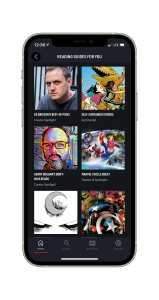
Marvel is now also providing personalized recommendations on the service, which it claims will “…offer recommended Reading Guides and series based on your current reading and favorites.” Looking at my current recommendations and based on what I know I’ve read on the service, it does seem like the recommendations are good. Recently I’ve been reading Matt Faction’s Hawkeye and Guardians of the Galaxy by Abnett and Lanning. Right now I do only see reading guide recommendations, but there’s a bunch here for Guardians characters, some for Hawkeye, and some creator spotlights and miscellaneous categories that do seem to line up with whaat I’ve been trying to read (IE hidden gems or self-contained stories). I would have liked to have seen something more expansive based on my reading history, but I’m not positive how far back it’s looking or what the specific algorithm its using is. I’m not disappointed, I’ll say that much!
What I’d Still Like to See
Overall, I’m really happy with the All-New, All-Different Marvel Unlimited, but there are still a few things I’d like to see added to the app.
Naturally, as I wrote before, I’d still like to see widgets for the app. At this point, DC Universe Infinite has me spoiled with their widgets and I’d like to see Marvel take a step in that direction. Still, there’s a few things about Marvel Unlimited that I really appreciate over DC Universe, including new books being added to the service three months after publication, instead of six, and the new addition of a substantial amount of service-exclusive books. Usually I’m not a fan of exclusive anything, but when it comes to something like this, I’d rather see digital exclusive books being given to Marvel Unlimited subscribers, instead of selling them on ComiXology. I’d say the same if DC went this route.
One thing Marvel removed with this update that I was a big fan of was the Random Comic button that used to live at the top of the app. That was an aspect of the app that I thought would have translated great to a widget. Now that the app has personalized recommendations, I think it would be great to see Marvel bring that back and tie it into that recommendation engine to try and grab random comic that it thinks you’ll like. Still, I don’t work at Marvel so I don’t know how frequently that feature was used. If it was removed, they had to have a reason and I’m going to choose to respect that.
Custom Lists in my library are a feature that I use on DC Universe Infinite quite a bit and I would have loved this latest update to have brought the functionality to Marvel’s service. While the option doesn’t currently exist, it does feel like Marvel is investing heavily in the service, between the new exclusive books and the app redesign. That means that down the road, something like that could potentially be added if the powers that be feel it is a wanted one. Fingers crossed.
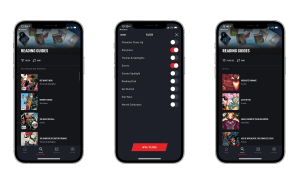
The Reading Guide discovery process is fantastic now! 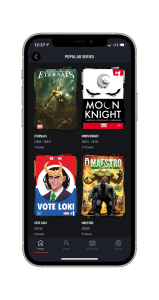
Some popular series. 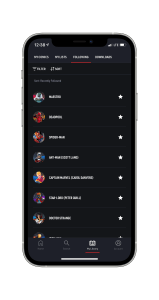
My character follows.
The last thing I’d love to see Marvel consider for the app is to bring it to MacBooks running Apple’s M1 chip. I’m not a huge fan of the web-based Unlimited experience (and that didn’t get an overhaul alongside the app, as best I can tell) but getting the mobile app onto Apple’s latest computers should be a piece of cake. I would like to play around with the iPad version using an external mouse and then I may follow up on this one with its own post if I feel it is warranted.
At the end of the day, I’m really happy to see that Marvel rebuilt the app and is doubling down on their subscription service. I’m really looking forward to reading the new Infinity Comics and also diving into the Shang-Chi backlog. I had a chance to see the movie earlier this week and I really enjoyed it.
If you’d like to sign up for Marvel Unlimited, you can do so here. Pricing is $9.99 a month, $69.99 a year (a great value if you love Marvel comics), or $99 a year for Annual Plus, which comes with a membership kit and a handful of other benefits. Marvel didn’t sponsor this post but this is a service that I feel I get a lot of value out of and want to make the option of signing up as easy as possible for anyone who wants to. You can also sign-up in app, though I’m not 100% sure of whether pricing is the same if you go that route.
Want to keep up on everything I’m creating around the web? Click here to sign up for my weekly newsletter That Jersey Gamer Weekly where I share content from both my blogs, miscellaneous writings that don’t make it into posts, and some of my favorite tweets I’ve sent in the last week.

 Dan Stransky