
Sleeve
Price: $5
Developer: Replay
Link: Website
Whenever I’m working on my Mac, I usually have some kind of music playing. Sometimes it’s video game chill hop, other times it’s metal. Regardless of what’s playing, I like to know what I’m listening to. While I do have a now playing widget on my Touch Bar thanks to BetterTouchTool, that solution isn’t the most useful if my MacBook is hooked up to an external monitor and running in clamshell mode. Sure, I could open Control Center to get a look at what’s playing, but I wanted something that was completely frictionless.
That’s where Sleeve comes in.
I don’t remember for the life of me where I first heard about the app — it may have been a blog or it could have been a podcast — all I know is that when I looked at the website, I was immediately in love with what I saw.
Built in SwiftUI for macOS Big Sur and later, Sleeve is a now playing app that’s highly customizable and sits right on your desktop. In the little window the app creates, you can see the album art, as well as song title, album, and artist information. You can control music playback from the window and if you’re using Apple Music or Doppler, you can even “like” what you’re listening too. Sleeve is also compatible with Spotify, though liking functionality is limited to the other two compatible services.
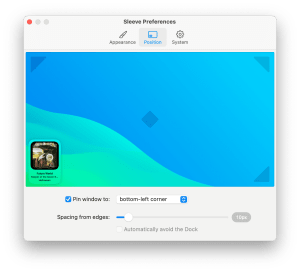
You can pin the app to any area of the screen. 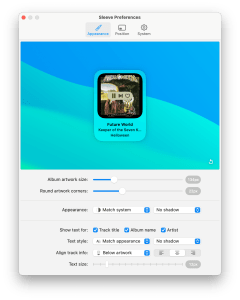
You can completely control the look and feel of the app. 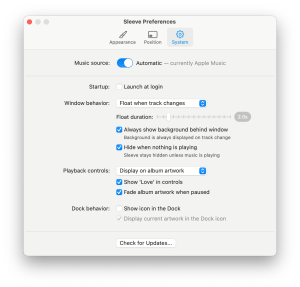
There’s plenty of options for the app’s behavior as well.
When I say the app is highly customizable, that’s not an exaggeration either. You can customize every aspect of the now playing window, from the shape of the album art to the location of track information, to the visibility of playback controls, to where the app is pinned on your desktop, and even how long the app hovers when a new track starts, if you’re into that kind of thing.
For me personally, I keep Sleeve pinned on the lower left corner of my monitor and do my best to arrange my windows so that the information provided is never obscured. If for some reason I accidentally throw an app over it in the rare cases where I’m working with one or two apps that are taking up my entire screen, I have it set to hover for two seconds when a new track starts.

The most recent update also added a feature that I really like: if nothing’s playing, you can tell Sleeve to hide itself! That was one feature I had really been hoping the developer would add, as starting music playback isn’t always the first thing I do when I sit down with my computer, so having the unused Sleeve window there was kind of annoying. I could have just not had the app launch at startup, but then that would once again create friction between hitting play and being able to keep an eye on what’s playing. I absolutely prefer frictionless workflows whenever possible.
The app is also incredibly reasonably priced considering how much work I imagine went into it. It’s available to download from the developer’s website for $5. If you listen to a lot of music while you work on your Mac this is a app that I wholeheartedly recommend.
Want to keep up on everything I’m creating around the web? Click here to sign up for my weekly newsletter That Jersey Gamer Weekly where I share content from both my blogs, miscellaneous writings that don’t make it into posts, and some of my favorite tweets I’ve sent in the last week.

 Dan Stransky
One thought on “‘Sleeve’ is the Now Playing App You Need on Your Desktop | App Spotlight”