Hello and welcome!
On May 20th, PopSockets launched their MagSafe-compatible collection which includes PopGrip for MagSafe, PopWallet+ for MagSafe, and the previously released PopGrip Slide Stretch. You’re probably wondering which product is right for you. Below, I’ve done write-ups on each of the products in the collection to help you decide which is best!
Note: PopSockets provided a MagSafe care package that made this post possible. All opinions are mine after extensively using all three of these products with my iPhone 12 Pro. Links to the PopSockets website are provided for convenience. They are not affiliate links and I make no money if you buy something from them — I just hate when I see a cool product and there isn’t a link to check it out.
PopGrip Slide Stretch
Price: $15.00
Link: PopSockets
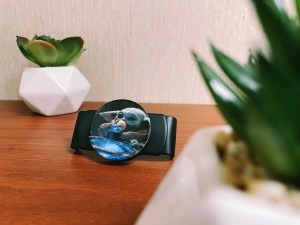
At a cost of only $15, the PopGrip Slide Stretch is going to be the cheapest option to have a PopGrip on your iPhone 12 while still having the ability to use MagSafe charging and accessories. I’m not going to dive too deep into this product here, as I’ve actually written an entire post about it already. This was the PopGrip that I used with my iPhone 12 Pro and leather case right up until the moment I got my hands on the PopGrip for MagSafe products.
This particular PopGrip is going to be best for those that don’t own a MagSafe-compatible phone case or want the ability to adjust where exactly their PopSocket is on their phone. The perk to the “slide” portion is that you can slide the PopGrip all the way to the bottom of the phone to prop it up when you’re recording videos in portrait or on a FaceTime call.
PopGrip for MagSafe
Price: $30.00
Link: PopSockets
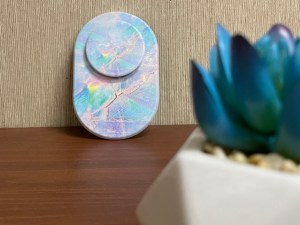
I’ve been excited for PopGrip for MagSafe since it was first announced at this year’s CES. When Apple first announced that the iPhone 12 family of devices would have magnets in them, PopSockets were the first company I thought needed to adopt it. It took some time, but eventually they did.
When I first saw images of PopGrip for MagSafe, I couldn’t help but notice how large it was (roughly double the size of a standard 3M base), but the size does make sense when you think about it. The iPhone 12 contains two magnets: a ring around the Qi charging pad and an alignment magnet below. For these magnetic PopGrips, PopSockets wisely opted to use both magnets for the best hold, despite the additional footprint.
On the back of the PopGrip, the part that makes contact with your phone case is covered in a smooth black rubber and you can very clearly see exactly where the magnets are. According to press materials from the company, these magnets are 60% stronger than the industry standard. This is evident as soon as you bring your iPhone and PopGrip near each other, the two are immediately drawn together, as if they were meant to be.
My biggest fear when I saw PopSockets adopting MagSafe compatibility was that the hold wouldn’t be strong enough, or that a bump in the car would cause my phone to fall to the ground. I’m proud to say that the strength claims of these magnets are accurate in my use. Once this PopGrip is on, it isn’t coming off if you don’t want it to.
Also worth noting is that despite the increased footprint, this base actually feels thinner than the classic 3M ones that we’re used to. I found my phone very easy to slide in and out of my jeans pocket while this was connected. I feel like some of the products DNA comes from the PopGrip Pocketable that the company also recently released.
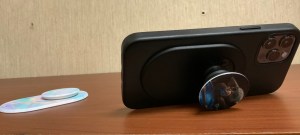
All of the MagSafe-compatible PopSockets are fully compatible with the complete PopMount 2 line of products. The one thing I did notice (and this very well could just be stupidity on my end) was that in order to get this properly into the PopMount 2 Vent Mount, I needed to pop it open one click, insert it, and then push it closed, much like with the PopMount 2 Flex. I think it’s because the setup is so thin that the PopTop is really right against the base, but again, it could also just be me being inept.
Finally, while the phone is in the Vent Mount 2, I noticed it was just a bit more structurally sound when tapping my phone screen while mounted, compared to the Slide Stretch. I’m not surprised by this, though. While the Slide Stretch is a single clamp holding the phone in place, this product is using two magnets and covers a lot more surface area. And for those of you that are worried, I’m not using my phone while driving, sometimes I’m just lazy and want to queue up a podcast while sitting at the gas station pump without actually taking my phone off the mount.
PopWallet+ for MagSafe
Price: $40.00
Link: PopSockets
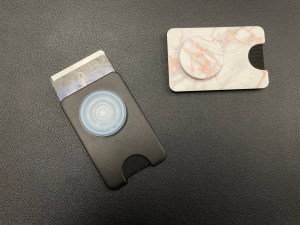
The other new MagSafe-compatible product that PopSockets has launched is PopWallet+ for MagSafe. For me, this product was actually a surprise hit. Over the years, I’ve tried to cut back on what I carry in my wallet, moving from a thick bifold to a metal card case. As soon as I got my hands on the PopWallet+ for MagSafe, I knew I wanted to try it out though.
I started off with several realizations I hadn’t thought of before.
- We’re in the middle of a global pandemic. I feel like a lot of places have gotten a lot better in terms of accepting Apple Pay and Google Pay, so I very rarely pull my debit card out anymore and mostly carry it in the event of an emergency.
- Despite having a credit card, I mainly use that for my Apple payments, and know well in advance if I’m going to need that card at a brick and mortar store.
- If I’m going to Walmart (and I’m going to use Walmart Pay anyway), why do I need to carry around an entire wallet.
So with that, I started putting the PopWallet+ for MagSafe into my daily rotation. I haven’t weaned myself off my wallet entirely yet, but when I head out to run some errands, I’ve started throwing my ID and debit card in there and leaving the rest at home.
Just like PopGrip for MagSafe, the PopWallet+ uses the same magnetic setup, though because of the way it’s shaped, the alignment magnet is about half the size. In everyday use, this has proven to not interfere with the wallets connection to the phone in any way.
The PopWallet+ is also thicker than the non-wallet magnetic base, but I do find the extra size to still be incredibly manageable. I haven’t had the wallet pop off of my phone when putting it into my jean pocket, though I did realize that I’ve been unconsciously using a “guide finger” ever since I got my first PopGrip early last year. For science, I did try and remove the wallet with the pocket on my work pants and it is possible, but you still have to use quite a bit of force. Whatever magnets are being used here are something that Apple should absolutely be looking at for the next iteration of their own wallet.
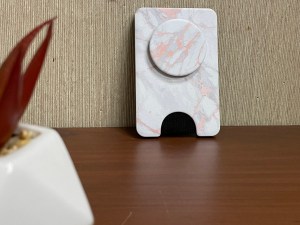
In terms of wallet capacity and function, the PopWallet+ is pretty much what you’d expect: two pieces of plastic with enough space to hold three cards and a cutout with some fabric to push the cards up. Like I said, when I take this out into the world, I only ever have two cards in it, but I did do some tests with three cards and had no issues getting any of them out, with the wallet attached to my phone the whole time. The wallet is also shielded, so the magnetic strip on credit and debit cards should be just fine.
Despite the shielding, PopSockets doesn’t recommend putting hotel keycards in there. Despite working in a hotel, I wasn’t able to test this due to some issues with my “control” key for the experiment. Still, I would just like to weigh in on why this wallet is fine for credit cards but not for hotel keycards.
The magnetic strip on your credit card isn’t designed to be reprogrammed again and again. The data that’s written to it is the data that’s on it. If you mess that up, you’re gonna need a new card. Hotel key cards, on the other hand, are designed to be reprogrammed again and again, which makes them easier to wipe and why one pass of your smartphone can have you heading down to the front desk to get your key remade.
Also on the subject of the PopMount 2 — I have found that the PopWallet+ is a lot easier to get into the mount for me than the PopGrip for MagSafe was. Whether that’s actually the case or just some kind of placebo effect to my ineptitude is to be determined.
In Conclusion
PopSockets has done some really great stuff here with their MagSafe-compatible products and there’s really something for everyone, as cliche as that phrase is. The choice of magnets inside the magnetic bases have significant strength to them, meaning you can trust that when they’re on your device, your device is secure. While PopGrip for MagSafe is the product that lives on my phone most of the time now, the PopWallet+ for MagSafe is one that I find myself grabbing when running my morning errands. As for the PopGrip Slide Stretch, I suspect I’ll be reaching for that one less and less, but if my phone ever winds up in a non-MagSafe compatible case, you can bet that’s the product I’ll be reaching for, as both of the magnetic PopGrips do require a phone case with magnets in them. I could see myself still grabbing that one on occasion for FaceTime calls at my desk, however.
That completes my guide to MagSafe-compatible PopSockets. Which product are you planning to pick up or are you already using? Sound off down in the comments below!

 Dan Stransky
One thought on “The Ultimate Guide to MagSafe-Compatible PopSockets”